Explore a topic
Phones.
One question. One useful answer.
HOW TO MAESTRO
All guides

How to Use the Explorer Gadget in Pokémon GO
Activate the Explorer Gadget from Map View or Item Bag to attempt catches and spin PokéStops as you explore; check storage, limits, and accessory conflicts.

How to Search and Filter Pokémon in Pokémon GO
Use the Pokémon list’s magnifying-glass search to filter your collection by name, CP, type, moves, status, and more.

Samsung News to Google Discover: switch your Galaxy feed
Replace Samsung News with Google Discover on a supported Galaxy phone. Find the feed selector and learn how Google News differs.

Best Free Scanner Apps for Android & iPhone: Top Picks
Compare free scanner options for iPhone and Android, including built-in tools, PDF export, OCR and paid limits. Microsoft Lens alternatives included.
How to tell if your iPhone has been hacked and secure it
Check for unauthorized Apple Account activity, secure the account, and distinguish account compromise from evidence about the iPhone itself.
How to Send View Once Text Messages on WhatsApp for Android
View Once text is reported as a limited Android beta feature; the steps apply only if your WhatsApp build shows the option.
How to Check for and Install the Latest Google Pixel Feature Drop
Check Settings > System > Software update; rollout timing and feature eligibility vary, and the supplied evidence covers the November 2025 drop only.
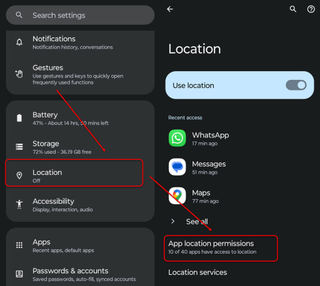
How to Find Which App Is Using Your Location on Android
Use Settings > Location > App location permissions to see which Android apps are allowed location access and adjust an app’s permission.

How to set up and personalize your OPPO Reno 17 smartphone
A cautious Reno 17 setup guide focused on verified passcode and face-recognition guidance, with model-specific uncertainties clearly flagged.

How to set up and use the Sony PlayStation Portal handheld with your PS5
Set up PS5 Remote Play on PlayStation Portal, connect over Wi-Fi, use the controls, and troubleshoot common connection problems.
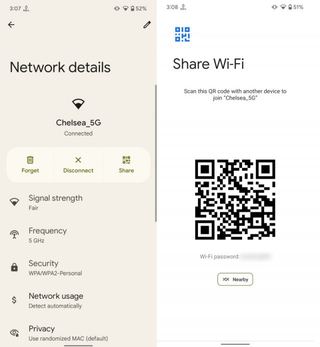
How to Recover a Wi-Fi Password on Android
Use Android’s built-in Wi-Fi sharing screen to reveal a saved network’s password or display its connection QR code.

How to connect Sony MDR‑3R wired headphones to a phone or computer
Step‑by‑step guide to plug Sony MDR‑3R wired headphones into a phone or computer, verify sound, and troubleshoot common issues.

How to convert a photo to PDF on a phone
Use the phone’s built-in options when available; Adobe Acrobat’s documented image-to-PDF feature works on iPhone and Android but requires a subscription.

How to transfer apps and passwords to a new phone
Transfer apps during phone setup, but verify saved passwords separately: the supplied instructions don’t guarantee that passwords will move.

How to transfer data from Android to Android using a USB cable
Use the new phone’s setup transfer flow, connect the Android phones with a compatible data cable, and follow the prompts until copying finishes.

How to Check for and Install a Samsung One UI 9 Update
Check One UI 9 through Galaxy Settings; availability depends on the device and rollout, and Smart Switch is a computer-based alternative.
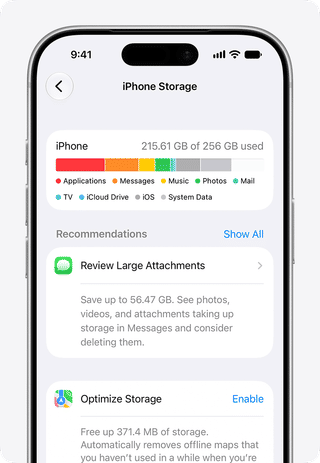
How to manage storage and free space on an iPhone
Check what uses iPhone storage, then reclaim space safely with storage recommendations, app offloading, or iCloud Photos optimization.

How to activate and manage the Reliance Jio 10,000‑rupee prepaid plan in India
Step‑by‑step guide to activate and manage the Jio ₹10,000 prepaid plan using MyJio, USSD or the website, with troubleshooting tips.

How to save photos on iPhone instead of iCloud
Turn off iCloud Photos on your iPhone and download the originals first if you want full-resolution copies stored locally.

How to Check for and Install the ColorOS 17 Update on a OnePlus 15
The OnePlus 15 India stable rollout began in October 2026; check the official update screen because delivery is staged and no November date is confirmed.
How to activate and manage a SIM card on your phone
A cautious guide to setting up and checking a physical SIM or eSIM, with iPhone model limits and carrier-directed troubleshooting.
How to set up a new iPhone and configure basic settings
Set up an iPhone, choose a supported transfer method, prepare a backup, and check essential settings without relying on unverified menu paths.

How to set up a Motorola Signature 27 smartphone
Use Motorola’s Signature-specific guide to follow the correct first-start and SIM steps; the available evidence confirms single- and dual-SIM variants but not detailed setup screens.
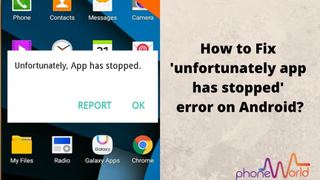
How to fix the "Program has stopped" error on Android
Quickly resolve Android’s “Program has stopped” crash by restarting, updating, clearing cache/data, and reinstalling the app.

How to print from a phone to an Epson printer
Choose Epson Smart Panel for a guided setup or Epson iPrint for documented photo and document printing; connect and configure the printer as directed below.

How to set up and personalize a Samsung Galaxy smartphone
Set up a Samsung Galaxy, transfer data with Smart Switch, and personalize its screen lock and keyboard.

How to Fix Telstra Missed Calls and Missing Missed-Call Text Alerts
Check Telstra’s MessageBank status, wait for the fix, then verify and refresh your missed‑call alerts on your device.
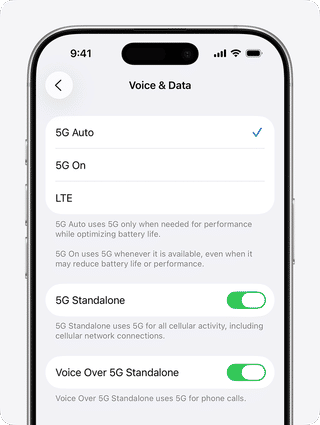
How to Turn On 5G on an iPhone or Android Phone
Enable 5G on iPhone or Android by confirming carrier support, adjusting the cellular data mode in Settings, and troubleshooting common issues.

How to update to Xiaomi HyperOS 4 on compatible devices
Update to HyperOS 4 via Settings → About phone → System update, after confirming eligibility, backing up data, and meeting battery/storage requirements.
How to move contacts from SIM to phone
Import SIM-stored contacts using Android Contacts or iPhone Settings, then check the Contacts app to confirm they appear.
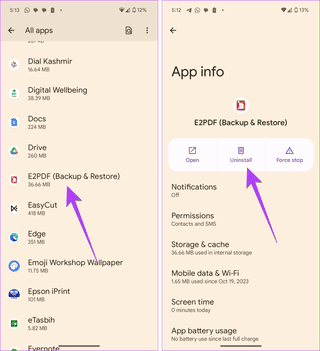
How to Uninstall a PDF Reader on Android
Remove a PDF reader using Android Settings or Google Play. Back up PDFs first and check what to do if Uninstall is unavailable.

How to Check for Android Security Updates and Avoid Data Loss from the “SMS of Death”
Check your Android version and security patch, install the latest update, and use ADB to clear malicious SMS if needed.

How to Prepare Your Landline for BT’s Analogue Phone Switch-Off
Check broadband speed, get a Digital Voice adapter, connect your handset, test, and add backup power before the Jan 2027 PSTN shutdown.
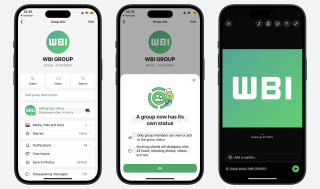
How to Share a Status Update with a WhatsApp Group
How to post a 24-hour WhatsApp Status for one group, with rollout caveats and checks if the feature is missing.

How to Access Your Halifax Accounts in the Lloyds Banking App
Use the Lloyds app with your Halifax account details; your existing Halifax accounts should then appear without a transfer.
What to Do If Your iPhone Duo’s Folding Display Cracks
Stop stressing the damaged screen and contact Apple Support to arrange an inspection; eligibility for repair or replacement is assessed by Apple.

How to Use a Rain Radar to Track Incoming Weather
Use the NWS radar viewer’s location search, radar loop, and legend to judge whether precipitation is moving toward your area.

How to Use Family Assist and the SOS Button on the Nokia 2360 Flip[1]
Set up Family Assist over SMS, configure SOS contacts and message, then verify settings and network availability without triggering a live alert.

How to Back Up and Share Photos with Google Photos
Back up photos to Google Photos, confirm they uploaded, then share selected photos or albums safely.

How to Add an Eligible FirstBank Card to Google Wallet and Pay with Your Phone
The supplied sources cover First Bank and Trust Company in the U.S., not a FirstBank Nigeria launch; confirm your card’s eligibility before adding it.
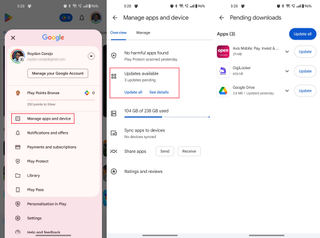
How to download and manage apps using the Google Play Store on Android
Install and update Android apps with Google Play, manage apps across devices, and troubleshoot downloads without risking local app data.

How to Set Up and Use an iPad mini
Set up your iPad mini, transfer or restore data, learn everyday controls, and troubleshoot common setup issues safely.
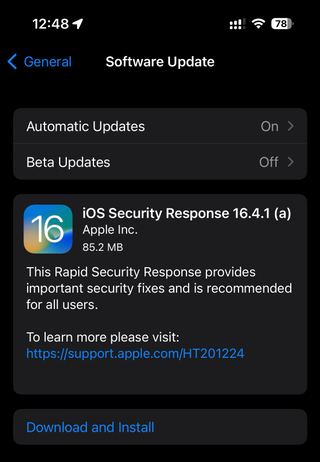
How to update Iphone to iOS 18
A practical guide to checking for and installing iPhone security updates, with backup prerequisites and troubleshooting steps.

How to Back Up and Restore WhatsApp Chats on Android and iPhone
Review WhatsApp’s privacy controls on Android or iPhone, use Privacy Checkup, and troubleshoot settings that do not appear as expected.

How to Compare Exynos and Snapdragon Phone Performance
A practical guide to comparing Exynos 2700 and Snapdragon phones without treating leaks, benchmark scores, or one device’s results as a universal verdict.

How to Spot Caller ID Spoofing and Avoid Phone Scams
A practical guide to treating caller ID as unverified, checking claims independently, and responding safely to suspected phone scams.

How to clear cache on iPhone and iPad
Clear cache on iPhone to boost performance and free up space! Discover our step-by-step guide for Safari, Chrome, and Firefox. Learn more now!

How to turn on automatic app updates on iPhone and iPad
Turn on automatic app updates on your iPhone and iPad to enjoy the latest features and security. Discover how to simplify your app management today!
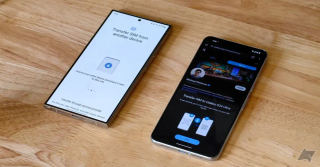
How to transfer eSIM to a another phone
Transfer eSIM to another phone effortlessly! Discover step-by-step instructions for a seamless transition. Learn more to keep your mobile service uninterrupted!

How to use AI photos editing on your Galaxy phone or tablet
Unlock stunning photos with AI editing on your Galaxy device! Discover easy tips and tools to enhance your images. Learn more now!

How to get Apple Intelligence
Learn how to get started with Apple Intelligence and explore essential tips and features to enhance your Apple experience. Discover translation capabilities, smart scheduling, and privacy enhancements.

Best Password Managers
Learn how to choose a secure password manager for your phone. Discover top password managers, essential features, and the importance of secure passwords.

How to scan a QR Code
Learn how to scan a QR code using your smartphone or Windows device. Discover the step-by-step process to access information quickly and conveniently.

How to pay with Apple Pay
"Learn how to pay with Apple Pay effortlessly! Discover the convenience of contactless payments in stores, apps, and online. Start today!"
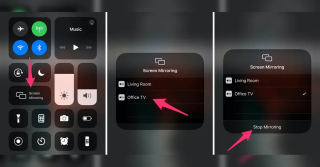
How to mirror iPhone and iPad to TV
"Learn how to mirror your iPhone and iPad to your TV effortlessly! Discover step-by-step methods for a seamless viewing experience. Find out more!"

How to wipe an iPhone or iPad
Wipe your iPhone or iPad securely with our step-by-step guide. Protect your data before selling or giving away your device. Learn more now!

How to build a deck on Pokemon TCG Pocket
Learn how to build a competitive deck in Pokémon TCG Pocket. Explore the best decks in the current meta and follow a step-by-step guide to create a powerful deck.

How to Record a Phone Call on Android and iPhone
Learn how to record phone calls on Android and iPhone effortlessly. Capture important conversations with our easy guide. Discover more now!

How to Unhide Apps on iPhone
Unhide apps on your iPhone easily! Follow our step-by-step guide to regain access to hidden apps. Discover how now!

How to Share Your Pin and Live Location: Using Maps, WhatsApp, and Other Apps
Share your pin and live location easily with Maps, WhatsApp, and more! Discover how to stay connected and never get lost again. Learn more!

How to Create New Emojis on iOS 18: Generate Genmojis with AI
Learn how to create new emojis on iOS 18 with Genmojis, customizable emojis generated by AI. Enhance your messaging experience with unique and personalized emojis.

How to Hide Apps on Your Phone
Learn how to hide apps on your phone, whether you're using an iPhone or Android device. Organize your home screen and maintain privacy with these step-by-step guides.

How to Change Siri's Voice
Learn how to change Siri's voice on your iPhone, iPad, or Mac. Customize Siri's accent and more

Fixing "Hey Google" Not Working on Android Auto: A Step-by-Step Guide
Learn how to fix the "Hey Google" voice command not working on Android Auto. This comprehensive guide provides troubleshooting steps, tips, and solutions to restore voice command functionality.

How to Fix Spotify Not Appearing on Android Auto
Having trouble with Spotify not showing up on Android Auto? Learn how to troubleshoot and fix this issue with step-by-step solutions. Enjoy your music effortlessly while driving.

How to Stream SuperFest 2024: Watch Clash of Clans, Clash Royale, and Brawl Stars World Championship Live
Learn how to stream SuperFest 2024 and watch the Clash of Clans, Clash Royale, and Brawl Stars World Championship live. Discover the best platforms, tips for a smooth streaming experience, and how to engage with other fans.

How to Transfer Data to Animal Crossing: Pocket Camp Complete
Learn how to transfer your data to Animal Crossing: Pocket Camp Complete to continue your gameplay seamlessly. Discover the steps to preserve your progress and enjoy the enhanced features of the upgraded app.

How to View All Apps on Android Auto
Learn how to view all apps on Android Auto for a seamless in-car experience. Discover tips to access and manage apps like Google Maps, Spotify, and more.

How to block spam calls on iPhone
Learn how to block spam calls on iPhone and protect your personal and financial security.

How to get Mew in Pokémon TCG Pocket
Learn how to unlock the elusive Mew card in Pokémon TCG Pocket by collecting all 150 Kanto Pokémon. Follow the step-by-step guide to add this rare card to your collection.
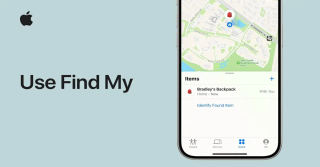
How to find my iPhone
Learn how to find your iPhone using the Find My iPhone feature. Follow the step-by-step guide to locate your device, enable Lost Mode, and erase your iPhone remotely.
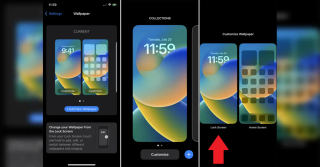
How to change wallpaper on iPhone
Learn how to change the wallpaper on your iPhone with this step-by-step guide. Customize your device with new wallpapers for the lock screen and home screen.

How To Unlock an iPhone from Carrier, iCloud, or Without Passcode
Learn how to unlock an iPhone from a carrier, iCloud, or without a passcode. Follow the step-by-step guide to regain full access to your device and start using it freely.

How to screen record your phone: Android and iPhone guide
Learn how to screen record on your phone, whether you're an Android or iPhone user. Capture funny moments, create tutorials, and preserve memories with this step-by-step guide.

How to restore Iphone notes disappeared after update
Learn how to restore disappeared iPhone notes after an update. Follow the step-by-step guide to recover your notes and prevent this issue in the future.