How to Send View Once Text Messages on WhatsApp for Android
View Once text is reported as a limited Android beta feature; the steps apply only if your WhatsApp build shows the option.
Check whether your Android app has the feature
WhatsApp’s official Help Center documents View Once for photos, videos, and voice messages, not ordinary text messages. Separate reporting describes View Once text as a feature available to select Android beta users, rather than a feature confirmed for every Android user.[1][2]
So first check the message composer in your own app. If the option described below is missing, there is no supported setting in the supplied evidence that you can use to turn it on. The available sources do not establish a minimum Android or WhatsApp version, or a wider release date.
Prerequisites
WhatsApp for Android, with the View Once text option actually available in your build.
An individual or group chat where you intend to send the text.
If you still need WhatsApp, use the phone installation guide. For the documented media version of View Once, see WhatsApp’s Android Help Center instructions.
Send a View Once text
Open the individual or group chat.
Type the message in the text box, but do not send it yet.
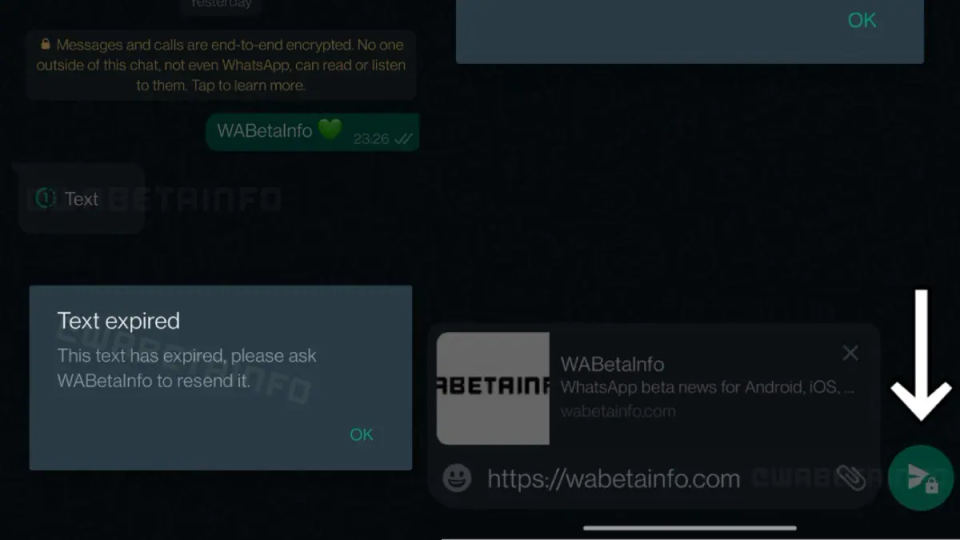
Long-press the green send button. Reporting on the limited Android beta says this opens a menu with a View Once choice.[2]
Choose View Once if that option appears, then follow any on-screen confirmation to send. The available report does not specify further screen-by-screen details, so do not assume a particular confirmation dialog or icon.
Check the chat for the sent message. The reporting says the recipient opens a View Once text in a separate interface and that it disappears after being viewed.[2]
For example, if you are sending a short one-time text, type it into the chat and hold the send button. Use the option only if View Once is explicitly shown. The sources do not establish additional text-message restrictions, such as a character limit.
Verify the result and understand the limits
Confirm that the message appears in the conversation after sending. The beta report describes a separate viewing interface and disappearance after opening, but it does not document a sender-side Opened receipt or explain how the feature behaves when read receipts are off.[2] Do not treat a missing message or status label as proof that the recipient has or has not read it.
The official View Once help page warns that one-time content is not a guarantee against someone preserving it by other means. It advises sending such content only to people you trust.[1] Avoid using the feature for information that must remain secret or that would cause harm if copied or recorded.
Troubleshooting
Holding Send does nothing
Make sure you are long-pressing the green send button after typing, not tapping it normally. If no menu appears, or the menu has no View Once option, the feature may not be available in your build. The cited report says access is limited to select Android beta users; it does not provide a verified version number or a way to enable the feature on all accounts.[2]
The recipient sees an ordinary message
The available sources do not explain compatibility behavior between beta and non-beta accounts. If the recipient does not see a View Once interface, do not assume the message was protected or will disappear. Confirm with them using another method, and avoid sending sensitive text until the feature is clearly available to both sides.
You need one-time photos, videos, or voice messages instead
Those media types are documented by WhatsApp. In an Android chat, tap the paperclip, choose Camera or Gallery, select or capture the content, tap the View Once icon (a 1 in a circle), and send when the icon turns green. For a voice message, hold the microphone and swipe up to lock recording, tap the View Once icon, then send.[1] These steps are for media and voice messages, not text.
[1]: https://faq.whatsapp.com/578442220724722/?cms_platform=android [2]: https://www.analyticsinsight.net/news/whatsapp-brings-view-once-text-messages-to-android-beta-users